


News & Exhibitions
Latest Factory Updates, Industry Trends & Global Exhibition Information
Touchscreen Controls for Hot Wood Presses: What Operators Should Monitor Each Cycle
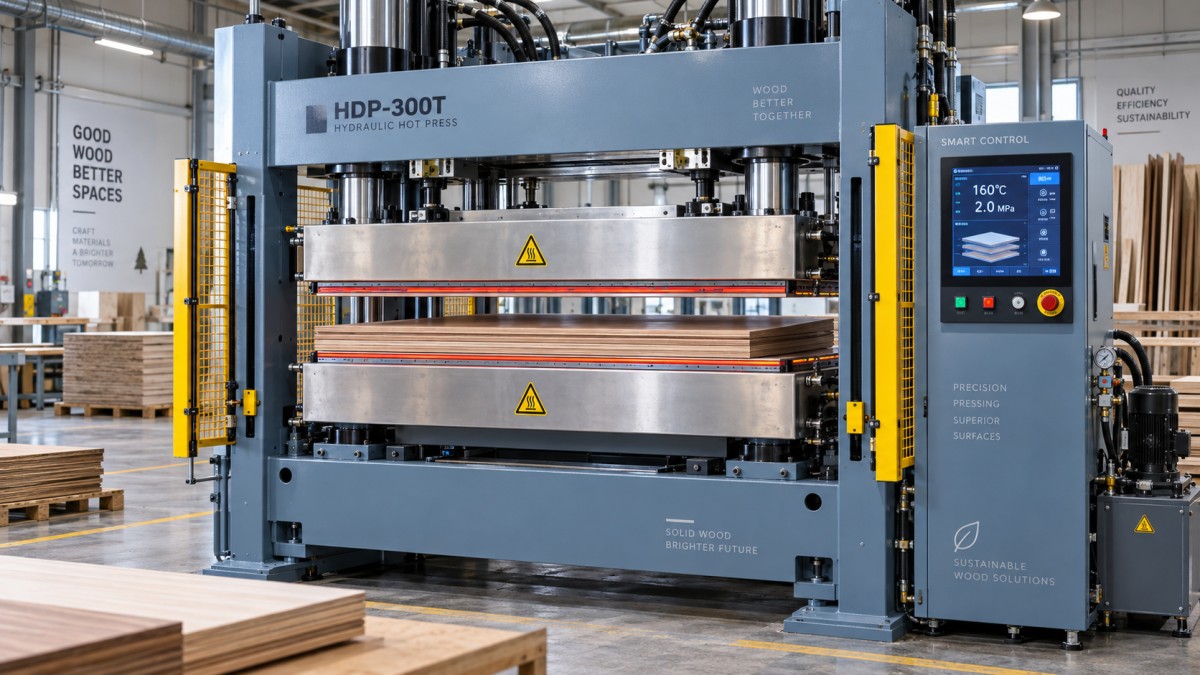
A hot wood press with touchscreen control can display the information needed to run a stable pressing cycle, but the screen does not guarantee a stable result by itself. Operators still need to know which values deserve attention, which changes are normal, and which signals indicate a problem before defective panels leave the press.
For most woodworking applications, the practical check is simple: confirm that the press reached the intended temperature and pressure, held both values consistently for the required time, and completed the cycle without material movement, safety interruption, or unexplained alarms. Those checks connect directly to bond quality, panel thickness, surface appearance, and machine availability.
Touchscreen controls make this work easier because setpoints, actual readings, recipes, and fault messages are available in one place. They are most useful when operators treat them as a process-monitoring tool rather than a start button with a display.
Start with the selected recipe, not the cycle start button
Before loading material, check that the touchscreen is showing the correct program or recipe. A stored recipe may include platen temperature, target pressure, pressure stages, press time, closing speed, and other machine-specific settings. Selecting a familiar recipe name is not enough if several materials, veneer types, adhesives, or panel thicknesses are produced on the same press.
A recipe that works for one laminated panel may not work for another. Thicker assemblies take longer for heat to reach the glue line. A veneer surface may need different handling from a coated board. Adhesive systems also respond differently to heat and open time. The press control can repeat a programmed cycle accurately, but it cannot decide whether the selected program matches the material currently on the loading area.
Check the job information against the actual stack before each production run and again after a recipe change. This is particularly important after shift handovers, maintenance work, or a short run of unusual panels. An incorrect recipe can produce panels that initially look acceptable but fail later through weak adhesion, excessive compression, print-through, or surface damage.
Platen temperature: watch the actual value and its behavior
Platen temperature is one of the first values operators look at, but the target number alone does not tell the full story. The screen should show both the programmed temperature and the actual temperature. The useful question is whether the platen has reached the intended operating condition and is holding it steadily enough for the job.
Starting a cycle while the platen is still warming can create inconsistent results between early and later panels. This is especially noticeable where heat activation or curing contributes to the bond. If the display indicates that one heating zone is behaving differently from another, do not assume the panel will receive even heat simply because the average platen temperature looks correct.
Temperature instability can come from a heating control issue, sensor error, electrical supply problem, or a machine that has not yet reached thermal equilibrium. A sudden or persistent difference from the normal operating pattern should be recorded and investigated. Repeatedly adjusting the recipe setpoint to compensate for an unexplained actual-temperature problem can hide the fault and make troubleshooting harder.
Operators should also understand the difference between platen temperature and glue-line temperature. The platen is the heat source; the center of a thick panel will heat more slowly. Increasing platen temperature or shortening the cycle without considering the material can change the surface result before it improves the core bond.
Pressure is more than a number on the screen
Pressure must be sufficient to bring the layers into contact and distribute adhesive correctly, but more pressure is not automatically better. Excessive pressure can squeeze too much adhesive from the bond line, mark a delicate surface, crush low-density material, or reduce the finished panel thickness beyond the intended result.
On the touchscreen, compare the actual pressure with the setpoint as the press closes and during the holding period. The actual reading should reach the programmed level in a controlled manner and remain stable. If it rises slowly, fluctuates, or cannot hold pressure, the issue may involve hydraulic performance, leaks, valve behavior, load distribution, or a mechanical obstruction.
Pressure must also be interpreted with the material layout in mind. A press may achieve its target hydraulic pressure while the workpiece still experiences uneven loading because the stack is poorly positioned, the caul plate is damaged, the panel thickness varies, or debris is trapped between surfaces. The control system confirms what the machine is doing; it does not replace a visual check of the loading arrangement.
Pressure stages need attention on multi-step cycles
Some hot pressing processes use more than one pressure stage. A lower initial stage may allow material to settle before full pressure is applied. A later stage may hold the assembly at a different level while heat and adhesive action develop. When the recipe includes stages, operators should verify that the display progresses through them in the expected order.
A cycle that reaches final pressure too quickly can contribute to material shift or adhesive starvation in some assemblies. A cycle that never advances beyond the first stage may leave a weak or incomplete bond. The touchscreen timeline or status display is valuable here because it makes the transition visible rather than leaving the operator to infer it from machine movement.
Pressing time must match the real cycle, not just the programmed value
Press time is often treated as the easiest setting: select the value and wait for the press to open. In practice, operators should monitor when the timed holding period begins. Depending on the control design, timing may start after the press closes, after target pressure is reached, or after another programmed condition is met. Those are not equivalent process points.
For consistent production, the same recipe should follow the same timing logic every cycle. Watch for unusual delays before pressure is achieved, timer pauses caused by interlocks, or a cycle ending earlier than expected after an alarm reset. A completed countdown does not prove that all process conditions were met unless the control sequence is configured to verify them.
Do not compensate for recurring defects by extending every cycle without identifying the cause. Longer pressing may reduce output without fixing a problem caused by poor adhesive application, incorrect moisture condition, uneven heat, or pressure loss. Time is one part of the press recipe, not a universal correction.
Material position is still an operator responsibility
A touchscreen cannot see whether a panel is square, centered, clean, and supported correctly unless the machine has dedicated sensing for those conditions. Before closing the press, inspect the stack for edge alignment, loose veneer, trapped chips, excess glue, warped components, and objects left on the platen or caul plate.
Misalignment creates more than an appearance problem. When an assembly shifts during closing, the pressure distribution may change and the edge may receive inadequate bonding. Mispositioned material can also damage the workpiece, interfere with press movement, or create a safety hazard. If the press includes a loading reference, light curtain, or alignment aid, confirm that it is functioning rather than treating it as a substitute for careful loading.
Panel thickness should be reasonably consistent across the stack. A localized high spot concentrates load, while a low area may receive insufficient compression. If repeated panels show the same localized mark or weak area, inspect the pressing surfaces and support arrangement before changing touchscreen settings.
Alarms should be read as process information
Alarm messages are often dismissed as interruptions, especially when the machine can be reset and restarted. That approach turns a useful warning system into a nuisance. The message, time of occurrence, and stage of the cycle can narrow down the cause of a production problem.
A temperature deviation alarm during warm-up points to a different investigation from a pressure-hold alarm midway through pressing. A safety circuit alarm may relate to a guard, sensor, emergency stop circuit, or loading-zone condition. Repeated communication or sensor alarms may cause unreliable values even when the press continues to move normally.
When an alarm occurs, record the displayed message and the active recipe before resetting it. Check whether the machine completed the cycle, stopped before pressure was reached, or released the panel unexpectedly. Restarting without this information can make intermittent faults difficult to trace and may allow suspect panels to mix with acceptable production.
Use trend screens and cycle history when available
Many touchscreen-controlled hot presses can show a history of temperature, pressure, cycle duration, alarms, or production counts. These records are most useful when comparing an abnormal cycle with a normal one. A panel defect is easier to investigate when the operator can see whether pressure dropped, heat was unstable, or a delay occurred during closing.
Trend data should support routine decisions, not create unnecessary paperwork. For a stable job, a quick review at the start of a run, after a recipe change, and whenever quality changes is often more useful than studying every completed cycle. Where the control allows notes or batch identification, connecting a rejected panel to the relevant cycle record can improve communication between production, quality, and maintenance teams.
Do not confuse repeatability with automatic quality control
A touchscreen makes settings easier to repeat, which is valuable for routine furniture components, veneered panels, laminates, and other pressed wood assemblies. Yet repeatability only helps when the incoming materials are also controlled. Changes in board condition, veneer thickness, adhesive spread, shop temperature, or storage time can alter the result even when the screen shows the same recipe.
This is why a practical cycle check includes both the control display and the finished panel. After the press opens, inspect the panel for edge lift, bubbles, surface marking, uneven thickness, visible movement, and abnormal glue squeeze-out. A defect seen immediately should be separated before it becomes a larger batch issue. Some bond failures may not be visible at once, so process discipline before pressing remains essential.
A workable check routine for every cycle
The routine does not need to slow production. It should focus attention on the points where an error can still be corrected.
- Confirm the selected recipe before loading the workpiece.
- Check that actual platen temperature is ready and behaving normally.
- Inspect platen surfaces, caul plates, and the material stack for cleanliness and alignment.
- During closing, observe whether the press moves smoothly and the pressure rises as expected.
- During holding, verify stable pressure, correct stage status, and normal timer progression.
- After opening, inspect the panel and read any message displayed before beginning the next cycle.
For a new job, changed material, or recently serviced machine, the first few cycles deserve closer attention than a proven, stable run. A small process change is easier to isolate when it is noticed at the beginning rather than after a full stack of panels has been produced.
When the screen indicates normal values but panels are still poor
If temperature, pressure, and time all appear normal yet defects continue, look beyond the touchscreen. Adhesive application is a frequent source of variation: insufficient spread, uneven coverage, excessive open time, contamination, or unsuitable adhesive handling can all affect bonding. Material moisture and surface condition can also matter, particularly with wood-based components that have been stored differently from the usual production stock.
Inspect the press surfaces and loading method as well. Repeated defects in one area of the panel may point to platen damage, uneven support, a worn caul plate, or a loading pattern that concentrates force. The right response is to compare the defect pattern with the cycle data and physical setup, rather than changing several settings at once.
When selecting or operating a hot press, responsive technical support and access to suitable spare parts can matter as much as the touchscreen interface. Manufacturers such as Qingdao Zhongding Machinery Co., Ltd., which provides woodworking machinery and ongoing technical support, can be a useful point of contact when operators need help interpreting machine behavior, maintaining control components, or restoring consistent press performance.
FAQ
Should operators adjust temperature and pressure during a normal production run?
Not routinely. If the approved recipe is producing stable panels, unplanned adjustments can introduce variation. Investigate the material condition, loading method, and alarm history first when quality changes.
Does a pressure reading prove the panel is pressed evenly?
No. The display confirms machine pressure, but uneven material thickness, debris, poor alignment, or damaged press surfaces can still create uneven pressure on the workpiece.
Why does the first panel after start-up sometimes differ from later panels?
The press may not yet be thermally stable, or the material may have a different temperature from the rest of the production run. Confirm actual platen conditions before relying on the first cycle as a quality reference.
What should be recorded when a press alarm appears?
Record the alarm message, selected recipe, cycle stage, and whether the press completed the holding period. Those details help distinguish a one-time interruption from a recurring process or maintenance issue.
Send Your Inquiry
We welcome your cooperation and we will develop with you.