


News & Exhibitions
Latest Factory Updates, Industry Trends & Global Exhibition Information
How to prevent sand-through when using a veneer sanding machine
One aggressive sanding pass can cut through a thin veneer, exposing the substrate and turning a valuable panel into costly rework. For operators using a Veneer Sanding Machine, preventing sand-through starts with controlling material removal—not simply choosing a finer abrasive. Veneer thickness, panel flatness, grit selection, sanding pressure, and feed speed all influence the result.
The difficult part is that damage often starts locally. Most of a panel may look excellent while one raised corner, glue-line ridge, or unsupported edge loses its decorative face. A reliable process protects those vulnerable areas while preparing the rest of the surface for finishing.
Know how much veneer is actually available to sand
Nominal veneer thickness is not a sanding allowance. The face may already have lost material during veneer preparation, panel pressing, or previous sanding. Thickness can also vary across a sheet, especially around joints and repaired areas.
Before setting the machine, check the panel specification and ask whether the stated veneer thickness refers to the original veneer or the finished face. Where possible, examine an offcut or a representative cross-section under magnification. A measurement of total panel thickness cannot tell you how much decorative veneer remains.
Treat an unknown sanding history as a reason for caution. Panels returned for rework may look almost identical to fresh stock, but their remaining sanding allowance can be much smaller. Keep them separate rather than feeding them under the same recipe.
Also distinguish between the purpose of the operation:
- Core calibration: bringing the substrate to a consistent thickness before veneering.
- Veneer preparation: removing light surface irregularities and preparing the face for finishing.
- Finish sanding: refining an already prepared surface without trying to correct panel geometry.
A thin veneered face should not become the correction layer for a poorly calibrated core. If the substrate is uneven, aggressive sanding after veneering removes the face from the high areas first.
Read the panel before adjusting the machine
Place representative panels on a suitable inspection surface and check for bow, twist, raised joints, edge swelling, and local bumps. Use a straightedge where appropriate. Inspect both faces, because debris or unevenness underneath can change how the upper face meets the sanding head.
Pay particular attention to corners and the first and last sections entering the machine. A panel that rocks, flexes, or changes support during feeding can experience uneven contact even when the thickness setting appears correct.
Under low-angle light, mark suspect areas on a separate inspection record or with an approved, easily removable marking method. Avoid deep pencil marks that encourage an operator to keep sanding until they disappear.
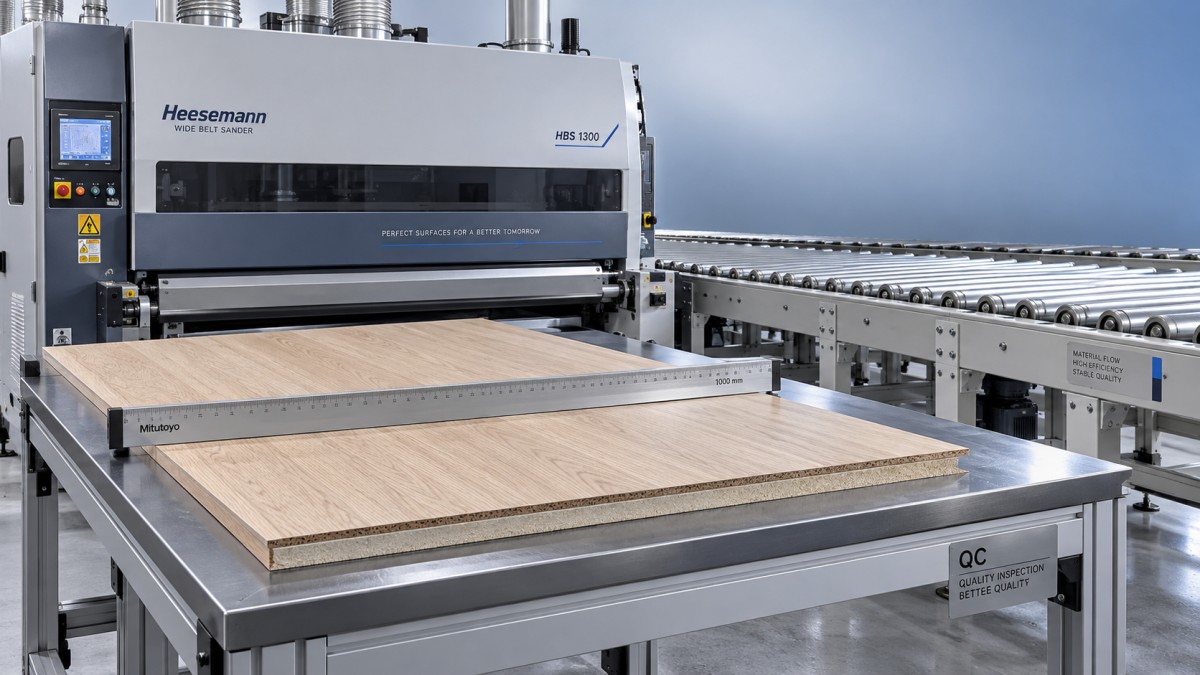
If a raised area comes from glue contamination or a pressing defect, decide whether it can be corrected without thinning the surrounding veneer. Sanding the entire face until one stubborn spot disappears is a common route to scrap.
Set up the Veneer Sanding Machine for controlled contact
Before testing a panel, confirm that the machine is clean and mechanically ready. Follow the manufacturer’s isolation and lockout procedures before cleaning, inspecting, or adjusting components inside guarded areas. Never reach toward moving belts or attempt to steady a panel by hand near the sanding zone.
Check the reference surfaces and transport system
A contaminated conveyor, uneven hold-down pressure, worn transport components, or an incorrectly aligned sanding head can create uneven removal. Check belt tracking, conveyor condition, pressure elements, and head alignment according to the machine manual. Confirm that the thickness display and actual machine setup agree using the manufacturer’s calibration procedure.
Do not compensate for a mechanical alignment problem by repeatedly changing the thickness setting. If one side consistently sands harder than the other, investigate the machine and panel geometry before sacrificing more material.
Use the appropriate head and contact arrangement
Different sanding heads behave differently. A hard contact roller concentrates cutting action and is generally less forgiving of local thickness variation. A correctly configured finishing platen or compliant contact arrangement may distribute contact more gently, but it still requires suitable pressure and engagement.
If the machine has an electronic segmented pad, verify that its panel detection and edge-control settings match the workpiece. Segmentation can help manage contact around edges; it does not make thin veneer immune to excessive removal.
Use only configurations approved for veneer processing on your machine. There is no universal pressure, head position, or sanding depth that is safe for every veneer species, face thickness, and machine design.
Balance abrasive, pressure, and feed speed—not one setting alone
A finer belt can still sand through veneer if contact is excessive or exposure is too long. Conversely, an unsuitable coarse belt may leave scratches that require more sanding than the face can tolerate.
For a relatively clean, pre-sanded veneer face, a trial might involve an abrasive in the P150–P180 range, followed by finer preparation only if the finish specification requires it. This is an example, not a starting recipe for every panel. Rougher faces, particular species, abrasive types, and coating systems may require a different sequence.
Avoid large grit jumps that leave scratches you later try to erase with repeated fine sanding. Equally, do not add a finer stage simply because another sanding head is available. Every active head consumes some of the remaining allowance.
When a belt becomes loaded, stop and address the cause using approved procedures. Resin, adhesive contamination, poor extraction, or an unsuitable abrasive may be involved. Increasing pressure to make a tired belt cut again is especially risky on thin veneer.
Prove the setup on a representative panel
The best test piece matches the production material: the same veneer, core, pressing condition, dimensions, and previous sanding history. A thick solid-wood offcut may confirm that the machine runs, but it cannot validate a thin-veneer sanding process.
- Record the starting condition. Note panel orientation, visible defects, abrasive specification, active heads, and current machine settings.
- Begin with conservative engagement. Follow the machine’s setup procedure rather than guessing a removal depth from the display alone.
- Run one test panel. Allow it to clear the machine fully before inspection.
- Inspect the whole face. Examine corners, edges, joints, and high spots under consistent lighting, not just the center.
- Change one variable at a time. Make a small, documented adjustment only when the inspection shows why it is needed.
- Confirm repeatability. Check additional representative panels before releasing the batch.
Before-and-after measurements at marked locations can help reveal uneven removal, provided the instrument has suitable resolution and repeatability. However, total panel measurements are supporting evidence—not proof that sufficient veneer remains at every point.
Keep a cumulative record when panels receive multiple passes or return for rework. “Just one more pass” is not a harmless adjustment when nobody knows what previous operations have removed.
Use the damage pattern to find the cause
When sand-through appears, stop the batch and quarantine affected panels. Reducing pressure may help, but the location of the defect often gives a better starting point than a general setting change.
- One side cuts more heavily: check cross-machine alignment, panel taper, conveyor condition, and uneven pressure.
- Leading or trailing ends are affected: investigate hold-down operation, panel support, and entry or exit contact behavior.
- Only corners or edges are damaged: check edge swelling, local thickness variation, pad overhang, and segmented-pad controls where fitted.
- Isolated patches appear: inspect for substrate high spots, trapped debris, glue ridges, or local veneer variation.
- The entire face is over-sanded: review total engagement, abrasive aggressiveness, exposure time, and cumulative passes.
Warning signs can appear before obvious substrate exposure: unexpected color changes, a grain pattern becoming faint, or an edge taking on a different texture. Natural figure and sanding dust can be misleading, so remove dust with an approved extraction method and inspect carefully. Do not keep sanding merely to see whether a suspicious patch disappears.
If the substrate is already exposed, further sanding will not restore the veneer. Route the part for an approved repair assessment, re-veneering, or replacement rather than attempting to blend away a structural loss of face material.
Keep downstream operations from creating another rework loop
Surface sanding is only one stage in cabinet and furniture production. Edge processing, handling, and finishing can introduce marks that send a panel back for unnecessary sanding. Agree on the required surface condition between stations, and protect finished faces during transfer.
For lines processing beveled cabinet or furniture components, the Beveling edge banding machine ZD450X is a separate edge-processing option for wood panels, MDF, and plywood. It combines automatic feeding, trimming, and polishing for 45° edge finishing, with a specified panel thickness range of 10–25 mm. It is not a veneer face sander; its relevance is in planning compatible edge and surface operations rather than using face sanding to correct edge defects.
Confirm the production sequence for the actual panel construction and finish system. A clean handoff between machines is often more valuable than another corrective pass.
Make the safe setup repeatable across shifts
Once a process works, save more than the machine’s numerical settings. Record the veneer specification, incoming panel condition, abrasive type and wear condition, head configuration, feed speed, pressure settings where applicable, and accepted inspection sample. Revalidate after belt changes, maintenance, material changes, or unexplained surface variation.
Qingdao Zhongding Machinery Co., Ltd., with more than 20 years in woodworking machinery, provides technical support and spare parts support alongside its equipment. When requesting troubleshooting assistance, send clear defect photographs, the machine model, panel construction, abrasive details, and the location of damage. That information supports a more useful diagnosis than “the machine is sanding too much.”
The operating principle is straightforward: remove only what the finishing process requires, and verify the result before continuing. Consistent inspection, sound machine condition, and a documented test procedure give operators a repeatable way to protect thin veneer—without relying on guesswork or last-minute rescue sanding.
Send Your Inquiry
We welcome your cooperation and we will develop with you.