


News & Exhibitions
Latest Factory Updates, Industry Trends & Global Exhibition Information
Why Does a CNC Panel Saw Chip Melamine Board Edges?
Chipped edges on melamine boards can spoil an otherwise clean cut, increase rework, and waste valuable material. If your CNC panel saw is leaving rough or broken edges, the cause may be a worn blade, incorrect scoring blade settings, improper feed speed, or insufficient board support. Understanding how these factors affect the cut can help operators identify the problem, improve edge quality, and keep production running efficiently.
The useful question is not simply whether the edge is chipped, but where and when the damage appears. A defect on the underside points operators toward a different set of checks than damage on the top face. Similarly, a cut that starts clean and deteriorates through a stack calls for a different investigation from one that is rough from the first tooth contact.
Start by reading the edge
Melamine-faced board has a hard, relatively brittle decorative surface bonded to a particleboard or MDF core. The core may cut acceptably while the surface fractures around the cut line. That is why a cut can look straight and dimensionally accurate but still be unsuitable for a visible furniture component.
Before changing settings, mark the top and bottom faces of a test panel and note the direction of travel. Inspect both long edges of the cut, not just the piece that will become the finished part. Also record whether the defect occurs along the whole cut, at the entry or exit, or only on certain sheets in a stack.
- Damage mainly on the scored face: Check scoring blade condition, depth, width and alignment with the main blade.
- Damage mainly on the opposite face: Inspect the main blade, blade projection, feed conditions and panel stability.
- Chipping at the beginning or end: Look for movement, unsupported offcuts or a feed transition that disturbs the panel.
- Random chips on both faces: Consider blade runout, vibration, contamination, inconsistent material or more than one issue at once.
These are diagnostic clues, not absolute rules. Blade direction and which face is scored depend on the machine layout. Confirm the saw’s cutting arrangement before deciding that a particular face is the “scoring side.”
Why the scoring blade matters
On a panel saw equipped with a scoring unit, the small blade makes a shallow preliminary cut in the vulnerable face before the main blade passes through the board. It helps sever the melamine coating cleanly instead of allowing the main blade to tear it away at the edge.
For this to work, the scoring groove must be correctly positioned and matched to the main blade’s kerf. If it is offset, one side of the finished cut may be clean while the other chips. If the groove is too narrow, the main blade can still break the coating at its outer edge. If it is excessively wide, the result may be a visible step or an unnecessarily wide cut, even if the surface is not chipped.
Depth matters as well. A scoring blade that barely reaches the coating may fail to cut consistently across a slightly uneven panel. Too much depth can make the scoring cut more conspicuous and does not compensate for poor alignment. Use the machine and blade manufacturers’ instructions as the starting point, then make small, controlled adjustments on test material.
Some scoring blades are adjusted for width using shims or a split-blade arrangement; others use a tapered design whose effective width changes with cutting depth. The adjustment method affects troubleshooting. On a tapered blade, changing depth may also change groove width, so check both after an adjustment.
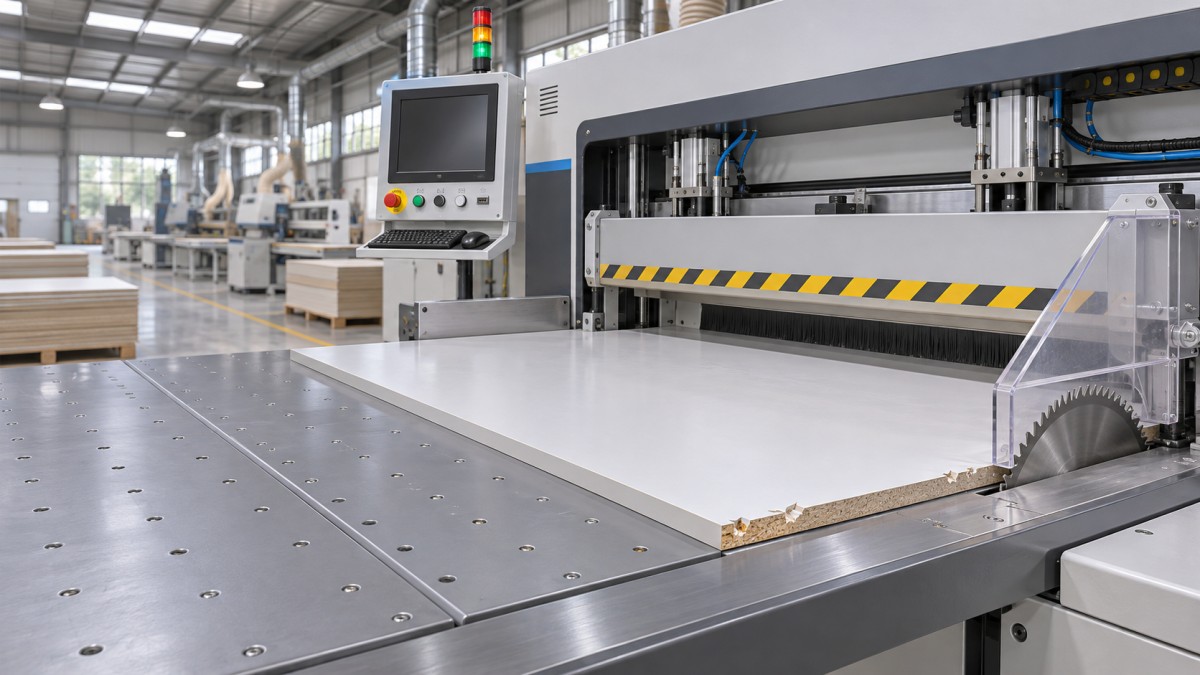
With power isolated and the blades fully stopped, inspect the scoring teeth and mounting surfaces. Resin, dust or a damaged tooth can undermine an otherwise correct setting. After reassembly, use the saw’s approved setup procedure and guards for a test cut. Never attempt to check alignment by reaching near a moving blade.
A sharp main blade is necessary, but not sufficient
A dull main blade tends to push and fracture the coating rather than cut it cleanly. Operators may also notice increased cutting noise, a rougher core, burn marks or greater resistance. None of these symptoms proves that the blade is worn, but a clean, correctly specified replacement blade is a useful comparison when cut quality has gradually declined.
Blade choice matters just as much. A blade intended for fast ripping of solid timber is not necessarily appropriate for laminated panels. Tooth geometry, tooth count, kerf and blade diameter should suit the material, the machine and the intended cutting conditions. Follow the blade supplier’s recommendations rather than assuming that the highest tooth count will always give the best result. The wrong combination can create excess cutting load or poor chip evacuation.
Inspect the blade for chipped carbide, buildup and signs of overheating. Cleaning or sharpening may restore a suitable blade, but repeated sharpening can alter its cutting geometry and kerf. After a blade change or sharpening, recheck the scoring setup; the previous groove width may no longer match.
Blade projection above the panel also changes how the teeth enter and leave the material. An unsuitable setting can affect edge quality and cutting load, but there is no single projection that works for every machine, blade and stack height. Start with the saw manufacturer’s recommended setting and adjust only within its permitted range. If the cut becomes cleaner only when the blade is set outside that range, look for the underlying fault instead.
Feed speed, stack height and panel movement
Feed speed affects the load on each tooth. If the saw advances too quickly for the blade and material, teeth can tear at the coating and the machine may struggle to maintain a stable cut. Slowing the feed can help diagnose this, but the slowest setting is not automatically best. Excessively slow cutting can encourage rubbing and heat, particularly with a dull blade or a poor blade choice.
Use a controlled comparison: cut the same board with the same blade and scoring settings at the normal feed, then at a moderately lower feed within the machine’s recommended operating range. If the edge improves, examine whether the original feed was too aggressive for that blade, stack or material. If there is little change, do not keep reducing speed while ignoring alignment or support.
Stack cutting introduces another variable. Sheets may bow, slide or fail to sit flat against one another, leaving some panels less securely held than others. A setup that cuts one sheet cleanly may not perform as well on a taller stack. Compare a single-sheet cut with the normal stack and inspect each sheet separately. If only one position in the stack shows damage, check for gaps, uneven clamping or debris trapped between boards.
Pressure beams, clamps, table surfaces and support rollers need to hold the work without damaging its face. Remove loose chips from contact surfaces and check that the board is supported throughout the cut. Narrow strips and offcuts deserve particular attention: if they shift or drop as the blade exits, the last section of the edge can break even though the rest is clean. Use the machine’s approved supports and handling arrangements; do not hold an unstable piece by hand near the cutting area.
When the settings look right but chipping continues
A good scoring setup cannot overcome a mechanically unstable saw. Excessive blade or arbor runout, worn bearings, loose components or poor alignment between the blade and the machine’s cutting path can cause vibration and an inconsistent kerf. Similar symptoms can arise from a damaged flange or debris between the blade and its mounting surface.
These checks require the correct measuring tools and the machine’s service limits. If the edge alternates between clean and chipped without a clear material-related pattern, or if vibration persists with a known-good blade, involve qualified maintenance personnel. Do not compensate for a mechanical fault by repeatedly widening the scoring cut.
Dust extraction also deserves attention. Poor extraction can leave chips on the table or in the cut, interfere with panel seating and obscure developing problems. Check for blocked ducting and accumulated waste according to the machine’s maintenance procedure. Extraction is not a substitute for a sharp blade, but a clean cutting area makes a stable setup easier to maintain.
Separate a material problem from a machine problem
Not all melamine-faced boards behave the same way. Core density, surface condition, bonding quality and storage damage can affect the edge. A panel with pre-existing surface cracks or damaged corners may produce chips that appear to be cutting defects. Board flatness matters too: a bowed sheet is harder to support consistently, especially in a stack.
If a saw cuts one board reliably but struggles with another, compare them under the same setup before changing the machine. Inspect the uncut faces and edges, note board thickness and construction, and keep samples from each material. The result may justify a different blade or feed setting for that board, rather than a permanent change to the standard setup.
Also distinguish cutting damage from handling damage. A clean edge can be chipped when a heavy panel slides across another sheet, hits a stop or is moved without adequate support. Inspect the edge immediately after the cut and again after handling. That simple comparison can prevent unnecessary blade adjustments.
A practical order for troubleshooting
Change one variable at a time and keep the test conditions as consistent as possible. Start with a representative single sheet, mark its faces, and make a test cut. Document the blade, scoring configuration, feed setting and location of the chips. Then work through the likely causes indicated by the defect.
Check blade condition and scoring alignment before experimenting extensively with feed speed. Confirm that the board is flat and supported. Once a single sheet cuts cleanly, return to the normal stack and production feed in stages. This sequence makes it easier to identify whether the problem follows the blade, the setup, the stack or the material.
If the fault remains unresolved, useful information for a service technician includes photographs of both faces, the board construction and thickness, blade specifications, scoring blade type, stack height, feed setting and the point where chipping occurs. Qingdao Zhongding Machinery Co., Ltd. provides technical support and spare parts for woodworking equipment; details like these help a machinery supplier assess whether the next step is a setup correction, a replacement component or an on-site mechanical check.
The aim is not to find one universal setting for every melamine board. It is to establish a repeatable setup for the material and blade in use, recognize when the edge begins to change, and correct the cause before a small defect turns into a stack of rejected parts.
Send Your Inquiry
We welcome your cooperation and we will develop with you.