


News & Exhibitions
Latest Factory Updates, Industry Trends & Global Exhibition Information
How to prevent uneven thickness with a plywood calibrating sander
Uneven plywood thickness can lead to poor bonding, inconsistent finishes, and costly rework. For operators, preventing these problems starts with understanding how a plywood calibrating sander works and how daily setup affects sanding accuracy. From checking the conveyor and abrasive belts to adjusting feed speed and cutting depth, small changes can make a measurable difference. This guide explains practical steps to maintain consistent panel thickness, identify common causes of variation, and keep production running smoothly.
Start by finding the pattern, not turning the handwheel
When a panel comes out uneven, the thickness display is an easy thing to blame. But a display can only indicate the machine setting; it cannot tell you whether the board entered flat, the conveyor gripped evenly, or one side of the abrasive belt had stopped cutting. Changing the setting before identifying the pattern may make the next panel worse.
Measure a sample panel at several repeatable positions across its width and along its length. Mark the feed direction and the left and right sides before sanding, then measure the same positions afterward. A calibrated thickness gauge or micrometer with suitable contact faces is more useful than judging by feel. Avoid measuring over loose fibers, surface debris, or visibly damaged edges.
Compare both the individual readings and the difference between them. A panel that is uniformly too thick points toward a different adjustment than one that is thin on the left and thick on the right. Also check the order requirements: a good average thickness does not make a panel acceptable if the variation across it exceeds the customer’s tolerance.
Check what is entering the machine
A sander can remove high spots, but it cannot reliably turn every unstable panel into a flat, uniform board. Plywood with a pronounced bow may be pressed flat under the hold-down system and spring back after leaving it. A panel with a loose core, an open glue line, or a locally crushed area can also behave unpredictably under pressure.
Sort unusually thick, warped, or damaged sheets before they reach the sander. Check whether the incoming thickness variation leaves enough material for the intended finished size without cutting through the face veneer. On decorative plywood, the thinnest area of the face may decide how much you can safely remove—not the thickest spot on the panel.
Let panels reach conditions appropriate to the workshop and the next production stage where practical. Moisture differences between sheets or faces can contribute to movement after sanding. If a board is flat at the machine but changes shape later, investigate storage, moisture, and construction as well as the sander setup.
Establish a dependable reference surface
A conveyor-feed sander removes material from the upper face relative to the surface supporting the lower face. If dust, chips, adhesive residue, or worn spots prevent the panel from sitting consistently, the sanding head may follow that error into the finished thickness.
Clean the conveyor and inspect it for damage, embedded debris, uneven wear, and poor tracking. Check that the pressure rollers or hold-down devices move freely and apply even pressure as specified by the machine manufacturer. Excessive pressure can flatten a bowed panel temporarily; insufficient pressure can let it slip or chatter. Either condition can look like a sanding-head problem on the finished board.
Support long sheets at the infeed and outfeed so their weight does not lift or drag the panel as it passes through. Feed panels straight and keep them within the machine’s specified working dimensions. Do not push, pull, or reach into the machine to correct a moving panel.
If the panel consistently comes out thicker on one side, inspect the conveyor, pressure system, and sanding-head alignment before compensating with a heavier cut. Alignment and internal adjustments should be performed by trained personnel with the machine isolated and according to the manufacturer’s procedure.
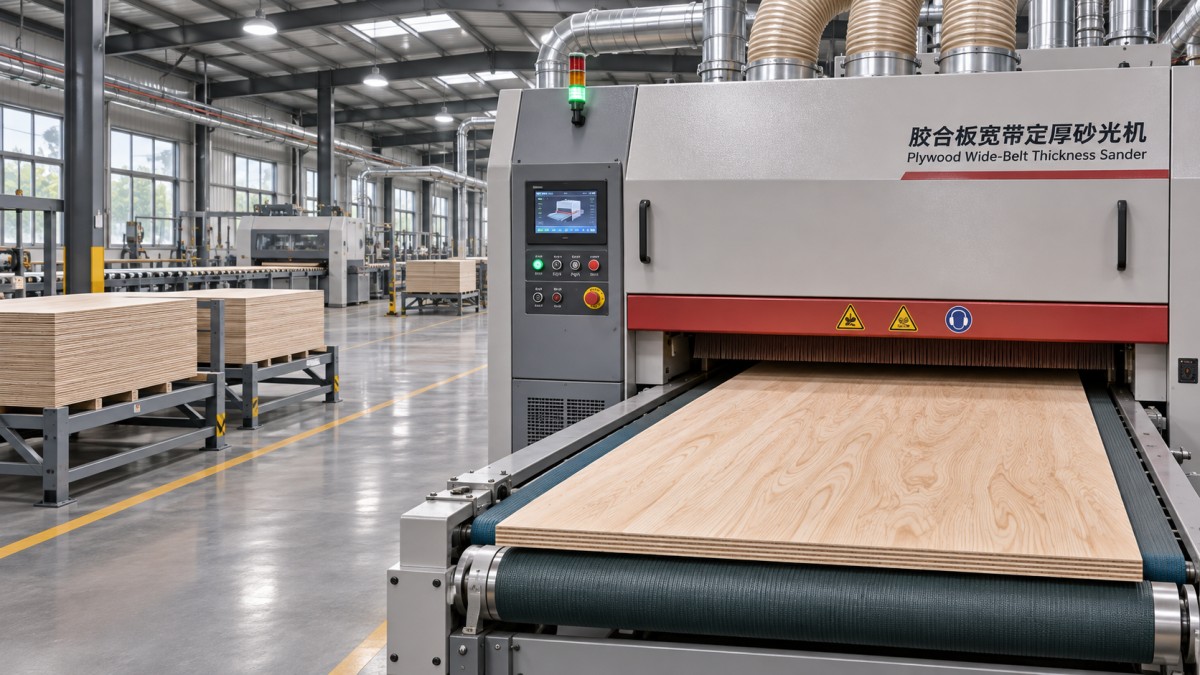
Use the abrasive belt as a cutting tool, not a cure-all
A loaded or worn belt may still polish the surface while removing material inconsistently. Resin, glue, and fine dust can fill the abrasive; a belt worn more heavily in one area may produce a recurring thickness difference across the panel. Inspect belt condition, tracking, tension, and oscillation using the machine’s approved procedure. Replace damaged or glazed belts rather than trying to recover accuracy by increasing cutting depth.
Choose grit for the job being done. Calibration requires an abrasive that can remove stock without excessive heat or loading; finish sanding requires a scratch pattern suitable for the next operation. A finer belt is not automatically the safer choice for a heavy cut. It can rub, heat the surface, and wear quickly.
Where the machine has multiple sanding heads, distribute the work between them according to the machine configuration and the belt manufacturer’s guidance. A common approach is to remove more stock with the calibration head and leave a lighter finishing cut for the following head. Confirm the actual head arrangement before setting the process; not every machine uses the same roller or platen combination.
Balance cutting depth and feed speed
Trying to reach the final thickness in one aggressive pass can overload the abrasive and motor, leave burn marks, or cause the panel to slip. Multiple controlled passes are often more predictable, especially when incoming sheets vary significantly. The right amount to remove per pass depends on the abrasive, panel construction, machine condition, and available power; there is no universal setting that suits every plywood product.
Feed speed affects both removal and surface appearance. A slower feed can give the abrasive more time on the panel, but slowing down is not a substitute for a fresh belt or correct alignment. Too slow can increase heat and loading; too fast can leave insufficient removal or visible sanding marks. Change one variable at a time, then measure the same positions on the next test panel.
For example, Qingdao Zhongding Machinery’s Wide Belt Calibration Sanding Machine range includes the ZDR-RP630, ZDR-RP1000, and ZDR-RP1300. The supplied ZDR-RP630 specifications list a 630 mm maximum working width, a 2.5–120 mm material thickness range, and a 6–30 m/min feed-speed range. Those are machine limits, not recommended settings for every panel. Confirm the specifications for the particular model and configuration before setting up a job.
For thin or veneered work, pay particular attention to the machine’s minimum thickness, hold-down capability, and the remaining face material. If the panel cannot be fed securely within the approved operating range, do not improvise a carrier or fixture without confirming that it is suitable for the machine.
Read the defect before changing the setup
The location of the variation often narrows the search. Use these patterns as starting points, not automatic diagnoses:
- One side consistently thicker: Check for uneven abrasive wear, debris on the conveyor, unequal pressure, or head-to-conveyor alignment. Compare several panels and feed positions before concluding that the head needs adjustment.
- Leading or trailing end thinner: Look for inadequate panel support, unstable feeding, or pressure roller problems. A short panel that does not meet the machine’s minimum length is particularly unsafe and may not be held consistently.
- Thickness varies between successive panels: Check incoming thickness, belt loading, feed consistency, and whether dust or chips are accumulating under the workpiece.
- Chatter or repeated marks along the feed direction: Inspect the abrasive, conveyor grip, rollers, and drive condition. Note whether the marks repeat at a regular interval; that information can help maintenance identify the rotating component involved.
- Burning or a polished patch with poor removal: Suspect a loaded belt, excessive contact, or an unsuitable combination of grit, feed speed, and depth. Stop and investigate rather than continuing to feed stock.
If the defect follows a particular sheet regardless of where it is fed, examine the panel. If it stays in the same position across several sheets, the machine or its setup becomes a stronger suspect. Marking the panel orientation makes that distinction much easier.
Keep dust extraction and routine checks in the process
Poor extraction can allow dust to load the abrasive and settle on the conveyor or workpiece. Check that extraction is running, connections are secure, and filters or collection systems are maintained according to their instructions. The supplied specification for the ZDR-RP630 lists a dust-collection volume of 5,000 m³/h; the actual system must be assessed for the installed machine and duct arrangement, not selected from a single figure alone.
At the start of a shift or a new job, a short test run can prevent a stack of suspect panels. Record the material, abrasive grit, feed speed, machine setting, and measured thickness at the selected positions. Recheck after changing belts, moving to a different panel construction, or noticing a change in sound or surface quality. Keep representative readings with the job rather than relying on the display alone.
Before cleaning, inspecting, or servicing internal components, stop the machine and isolate its energy sources under the site’s lockout procedure. Follow the equipment manual for guarding, dust handling, and personal protective equipment. If routine checks do not explain a persistent taper or chatter, stop making compensating cuts and involve maintenance or the equipment supplier. Qingdao Zhongding Machinery provides technical support and spare parts; having the machine model, defect pattern, and measurement record ready makes that conversation more useful.
Send Your Inquiry
We welcome your cooperation and we will develop with you.