


News & Exhibitions
Latest Factory Updates, Industry Trends & Global Exhibition Information
Remote Support for Woodworking Machinery: Network and Access Requirements
Remote support is practical for a woodworking machine only when the service provider can reach the right diagnostic information through a connection the factory can control. An internet connection alone is not enough: the machine may have no supported remote interface, the required software may be unavailable, or the proposed access method may expose more of the production network than the job requires.
For a technical evaluator, the first decision is what the supplier needs to do remotely. Viewing an alarm log, examining a controller program and changing motion parameters require different levels of access. Define that task before approving a network path, and establish which actions must remain under local control. Where a machine cannot be connected safely or has no suitable interface, photographs, video and exported diagnostic files may still support effective troubleshooting.
Start with the machine and the intended support task
The remote support requirements for woodworking machinery vary considerably between a networked CNC machining center and a conventional sliding table saw. A CNC controller may provide diagnostic screens, logs or a vendor-supported service interface. A simpler machine may have electrical controls and a digital display without any facility for remote network access. Digital indication on its own does not establish that an external technician can connect to the equipment.
Before discussing bandwidth or firewall rules, identify the equipment configuration: machine model and serial number, controller and HMI versions where applicable, installed network interfaces, and any service software or gateway already present. Also establish whether the supplier supports remote access for that specific configuration. Hardware fitted to one machine revision should not be assumed to exist on another.
The intended task determines what needs to be connected. For example, a technician investigating an intermittent axis fault may need controller alarms and drive status. A problem with cut quality may be better assessed using photographs of the workpiece, tooling details and measurements taken on site. A live connection can help with the first case, but it does not replace physical inspection in the second.
The ZD3200 sliding table saw illustrates why this distinction matters. Its specified features include a digital angle display, manual blade tilting and electrical blade lifting. Those features do not establish a remote service interface. For a cutting or adjustment issue, the initial support package might instead include the displayed angle, photographs of the setup and a description of the fault; any proposed electronic connection would depend on the equipment actually fitted.
Build a defined path to the equipment
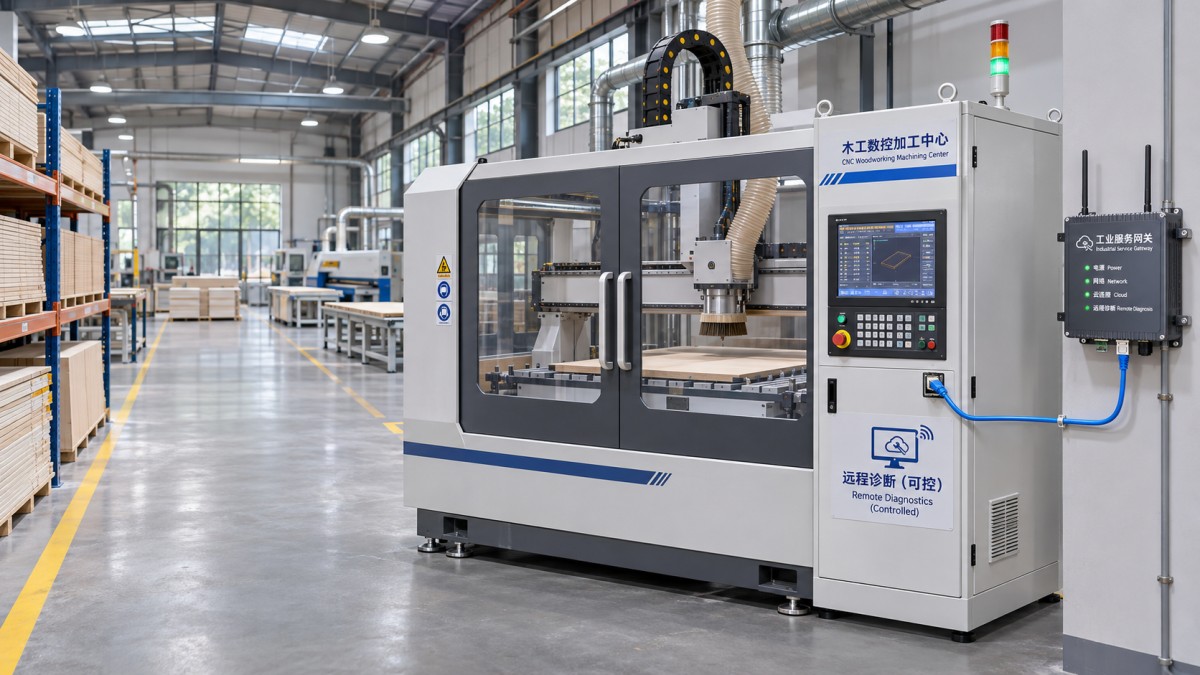
Map the complete connection from the external technician to the target device. A typical path may pass through the factory internet connection, a company-managed remote access service, an industrial network segment and a service workstation or approved gateway. The controller should be reachable only through the components required for the agreed task.
Separating production equipment from office networks and restricting traffic between network segments can limit the consequences of a compromised account or device. The exact design depends on the site and the machine, but the access request should identify the source, destination, protocol, ports and expected duration. Rules should be specific enough to reach the authorized equipment without opening a general route into the plant network.
Where practical, use a managed, encrypted remote access service with individual accounts and multifactor authentication. Avoid exposing a controller, remote desktop service or other machine interface directly to the public internet. A supplier-hosted platform, site-managed VPN or dedicated service gateway may each be suitable in some environments; the choice depends on who administers it, how sessions are approved and whether it is compatible with the machine.
Do not assume that a service tool requires inbound access from the internet. Some tools initiate an outbound connection to a service platform; others require a different arrangement. Obtain the documented connection requirements for the actual tool, including its destination addresses or domains, protocols and ports. The site network team can then assess whether firewall, proxy or DNS settings permit the connection without granting broader access than necessary.
Connection quality matters more than a generic speed figure
Remote diagnostics can be sensitive to interruptions, latency and packet loss, particularly when a technician is viewing a live interface or transferring a service package. The bandwidth needed depends on the tool and task: reading logs is different from sharing a high-resolution video feed or transferring a controller backup. Ask the tool provider for its requirements and test the intended workflow from the actual production location.
Wired Ethernet can provide a predictable connection where suitable cabling is available. Wi-Fi may be useful for a service laptop, but coverage and interference should be checked near the machine rather than inferred from office performance. A cellular connection can serve as an alternative where site policy permits it and signal is adequate. Any temporary connection still needs authorization, appropriate protection and removal after the session; it should not become an unmanaged route around plant security controls.
Plan for a lost connection. A disconnected screen-sharing session may simply delay diagnosis, while an interruption during a software update or configuration transfer can leave the machine in an uncertain state. The supplier should specify whether an operation can be interrupted, how its outcome is checked and what recovery resources must be available locally.
Grant access for a task, not for an open-ended visit
Remote access should be approved by a person responsible for the equipment and coordinated with the site’s IT or operational technology team. Use named accounts wherever the access system supports them, limit permissions to the task, and set an expiration or disable access when the work is complete. Shared credentials make it harder to establish who performed an action and should be avoided.
Distinguish between permission to observe and permission to make changes. A troubleshooting session may begin with read-only access to alarms and status information. Uploading a program, changing parameters, updating firmware or writing to a controller requires explicit approval, a qualified person and a recovery plan. Where the tool does not provide reliable read-only controls, treat the session according to what the technician can actually do, not what they intend to do.
A useful service request records:
- The fault, affected machine and reason remote access is needed.
- The named technician, approving site contact and scheduled access window.
- The devices and systems in scope, including any service laptop or gateway.
- The permitted activities and any prohibited actions.
- The person responsible for ending access and reviewing the session record.
Logging should cover access attempts, session times and the identity of the user. Where the system supports it, retain an appropriate record of actions or changes, subject to site policy and privacy requirements. The supplier’s own logs can supplement site records, but the factory should understand what is recorded and how it can obtain the information needed for an investigation.
Keep machinery safety under local control
Cybersecurity authorization does not make a remote operation physically safe. A connected woodworking machine may contain moving axes, saw blades, clamping devices or automatic material handling equipment. A local competent person needs to assess the machine state, keep people clear of hazardous areas and follow the site’s operating and isolation procedures.
Agree in advance whether the remote technician can issue commands, alter settings or only observe. Do not assume that a remote stop, a closed remote session or an ordinary software command provides the protective isolation needed for maintenance. If a task requires a guard to be opened or a person to enter a hazardous area, use the site’s established procedures for stopping and isolating the equipment. Safety functions must not be bypassed for convenience during troubleshooting.
Some tests may require the machine to run. In that case, agree who can initiate movement, who monitors the work area and how the test will be stopped. A local operator should be able to communicate directly with the remote technician throughout the test. If the connection fails or communication becomes unclear, stop and reassess before continuing.
Prepare and verify the support session
Compatibility should be checked before a breakdown makes the decision urgent. Identify the operating system and service software needed, how the tool is installed and updated, and whether it can communicate with the controller version in use. Older equipment may rely on a serial connection or a dedicated service computer rather than a network port. Adding a gateway or adapter may be technically possible, but it must be supported and assessed as a new access path.
Keep current backups appropriate to the machine, including relevant controller programs, parameters and configuration files where the equipment permits them. Confirm who is authorized to make a backup, where it is stored and how restoration would be performed. A backup is more useful when the team knows that it corresponds to the installed configuration and has a documented recovery procedure. Protect exported files too: programs and configuration data may contain production information or settings important to safe operation.
Before the first live session, conduct an agreed connectivity test that does not require changing machine settings. Confirm that the technician can authenticate, reach only the intended system, view the necessary diagnostic information and disconnect successfully. Check that site personnel can end the session and that the expected logs are available. Record any dependencies, such as a service laptop, licensed software or a staff member who must enable the gateway.
At the end of a diagnostic visit, document the findings and any approved changes, disable temporary accounts or access rules, and return the machine to its normal operating state under local procedures. If the diagnosis cannot be completed remotely, the session record, alarm history and configuration details provide a clearer basis for an on-site visit or further parts assessment.
Send Your Inquiry
We welcome your cooperation and we will develop with you.